Tutorial
Export for homework and reports
Every format is free and unwatermarked. Pick the one your teacher, CAD program, or spreadsheet actually wants.
Finish the measurement first — including a glance at ± — then export. Placement steps live in how to use andphotos orPDF pages.
1. Check the reading
Confirm the vertex and rays, then read the ±. Exporting a sloppy overlay does not make it more precise.
2. Open Export
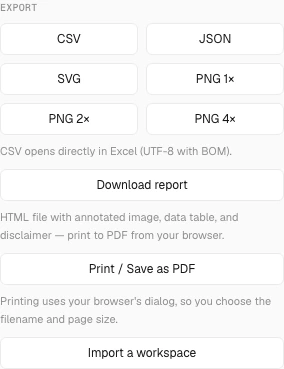
The Export section lists CSV, JSON, SVG, PNG sizes, a report, print, and workspace import. Nothing in that list is paid or branded on the file.
3. Match the format to the assignment
- PNG 2× or 4× — annotated picture for a slide or printed sheet.
- SVG — editable vectors in Illustrator, Inkscape, or a drawing program.
- CSV — every angle, complementary value, slope, and uncertainty column for Excel or grading.
- JSON — reopen and keep editing later.
- Download report — HTML with a 2× image, table, embedded CSV, and the measurement disclaimer. Open it, then Print → Save as PDF.
- Print / Save as PDF — browser print dialog on the live page.
4. Hand in without a watermark
There is no logo burned into PNG, SVG, or the report. You are still responsible for whether a photograph measurement is evidence enough for the assignment — see the disclaimer if the work is more than homework.
Common mistakes
- Sending 1× PNG when the teacher will print at A4 — use 2× or 4×.
- Emailing JSON when they asked for a picture.
- Skipping the report’s Print step and submitting the raw HTML by accident.